

This post in 30 seconds.
- The gap: a status field records that somebody pressed a button. It holds no information about what was actually done on site.
- The idea: make completion evidence part of closing the job. Before and after, the identifiers, a short spoken explanation, captured by whoever is already standing there.
- The mechanics: guided capture from a link, no app on the technician's or contractor's phone, reviewed remotely with four possible answers: approve, question, retake, escalate.
- Written for: operations and quality managers running field crews plus external contractors, in utilities, facilities, installations and property work.
The job list goes green by Friday afternoon. Fourteen work orders, fourteen Completed statuses, and a scheduler who can now close the week. Three weeks later one of those jobs comes back as a complaint, the contractor says the work was done properly and the customer says it never looked like that, and the only record anyone has is a timestamp and a name.
That is the whole problem in one line. Your system knows a button was pressed. It doesn't know what the site looked like when the crew drove away.
Proof of work is the practice of closing that gap: requiring visual evidence of the finished work as part of completion, not as a favour afterwards. If contractor quality that stays invisible until somebody complains, or supervisors driving out purely to look at finished jobs, sounds like your week, this piece was written for you. We build Venta Capture, a product of VentaVid: guided visual capture that turns the phone already on site into your completion record. Start a free account and build a completion flow for one job type this week.
In this post:
What proof of work means in field service
One disambiguation first, because the search results are full of it: this has nothing to do with blockchain mining. In field service, proof of work means evidence that the job was done, and done to standard, produced at the moment of completion by the person who did it.
A status field is a statement about your database, not about the site. It records that a work order moved from one state to another, at a certain time, under a certain login. Everything a reviewer actually wants to know sits outside that record.
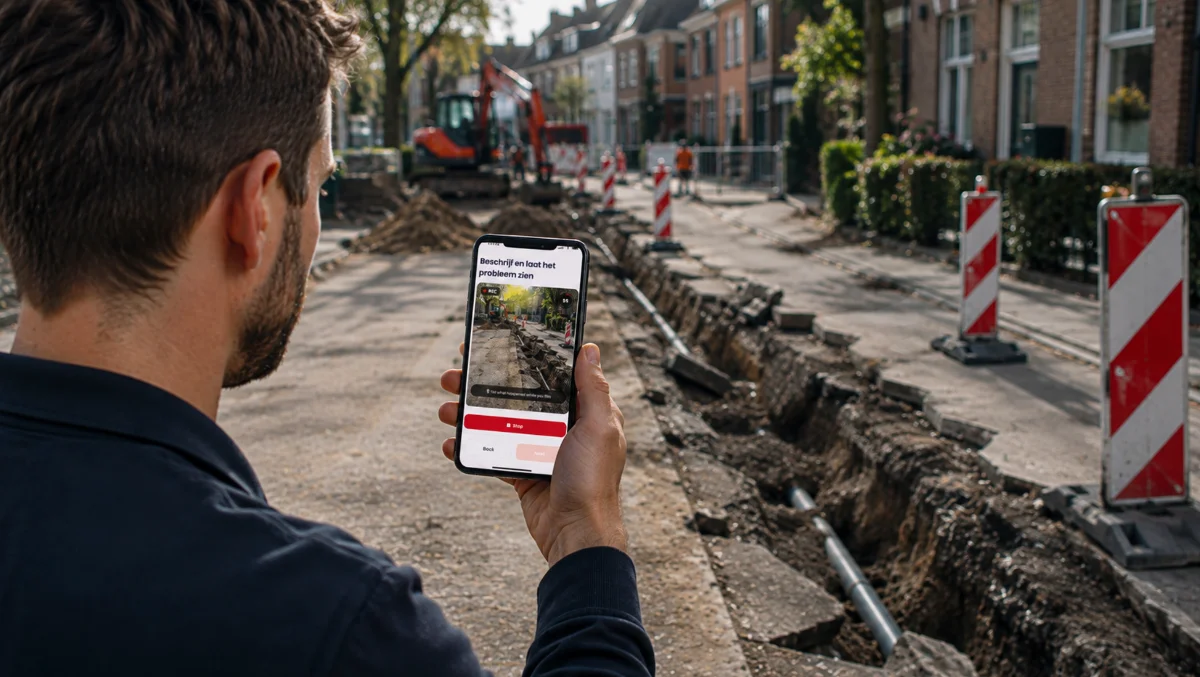
Completion evidence is the missing half. In practice it means a short, structured capture taken as part of closing the job: the finished work, the surrounding area, the asset identifiers, plus a spoken explanation of anything unusual. Not "send a few photos when you're done", which produces four blurry close-ups of a component nobody can place.
The distinction matters because those two things get confused constantly. Marking the job complete is an administrative act. Showing the work is an evidential one.
You will also hear this called proof of completion. Service contracts tend to use that phrase, and so do most field service management vendors, usually meaning a signature plus a photo attached to the closed order. Treat the two terms as the same thing. Proof of work, proof of completion, completion evidence: whichever one your contract or your software uses, the test is identical. Could someone who was not on site look at the record and tell what was done, to what, and in what state it was left?
Don't just mark the job complete. Show the work.
Venta Capture runs that as a loop with six steps: request, guide, capture, verify, review, act. Same infrastructure behind a remote video inspection, a rental handover, or a service intake. Completion is simply the point in the process where you point it.
What a blind "Completed" status costs
Rework is the obvious cost, and the honest answer is that almost nobody knows their own number. In a study by Peter E. D. Love published in the Journal of Construction Engineering and Management, covered by ASCE's Civil Engineering Source, measured precompletion rework averaged 0.38% of contract value, rising to 0.76% once postcompletion corrections were included. The finding worth sitting with is the other one: actual rework costs were underreported by 300%, because the data simply weren't captured.
Widen the lens and it gets heavier. The UK's Get It Right Initiative puts the direct cost of avoidable error at around 5% of project value, and the total cost, once indirect costs and latent defects are counted, at 10% to 25% of project cost.
You cannot manage a quality problem that never generates a record. A Completed status is, by design, a record with no quality information in it.
Then there is the verification visit. When a supervisor drives out purely to look at finished work, that trip has a price. VSight's field-service glossary is careful to say there is no verified industry benchmark for a truck roll, which is refreshingly honest; the estimates it collects run from $150 to $500 on the surface, and around $1,000 once indirect costs are counted, with S&C Electric putting utilities at $250 to $500 as a conservative figure. Blitzz reaches a similar range.
Run your own version of that math. Six confirmation visits a week, at a conservative $300 each, is roughly $93,000 a year spent looking at work that was probably fine. That is an illustration, not a benchmark, and the point is only that the number is never small. Some of those trips are unavoidable. Most of them exist because there was nothing to look at from the office. (We wrote about the same arithmetic from the diagnostics side in the piece on digital service intake.)
And when the argument becomes formal, time is the cost. Arcadis's 15th annual construction disputes report for North America found the average dispute took 12.5 months to resolve in 2024, down from 14.4 months the year before, with an average value of $60.1 million. Your contractor disputes are smaller than that. They still run on the same fuel: two accounts of the same site, and no record made at the time.

What completion evidence should actually contain
The useful mental model is before and after, not just after. An after-only photo tells a reviewer what things look like now. It cannot tell them what changed.
Capture before the work starts:
- Original condition: the asset and the area as the crew found them.
- Visible damage: anything already wrong, recorded before anyone touches it.
- Work environment: access, obstructions, the conditions the crew is dealing with.
- Relevant components: the parts the job is actually about, with identifiers legible.
Capture after the work finishes:
- The completed work: the thing you are being asked to accept.
- The repaired or installed area: close enough to judge, wide enough to place.
- Resulting condition: including the state the site was left in.
- Relevant surroundings: what the next person walks into.
What lands in the reviewer's inbox should be a structured visual evidence package, not a folder of images. That package is your proof of completion, so it needs to survive a reader who was never on site. That means the capture plus the answers to the flow's questions, a transcript of what the technician said out loud, receipt timestamps, integrity information, technical signals, and the case history of who did what next. A folder of photos makes a reviewer do archaeology. A case gives them a decision.
On integrity, be precise about what you are claiming. Venta Capture records 28 control points per submission: 10 automatic signals, 21 recorded session events and one signed seal, with SHA-256 fingerprints so the file you open in nine months can be shown to be the file that arrived. Capture is real time only, so a submission is not a gallery upload of something from last year.
The timestamp proves receipt, not the event. A server-side receipt time tells you when your system received the submission, and nothing more. It does not prove when the work happened. Anyone selling you a timestamp as proof of an event is overselling it, and a contractor's lawyer will find that out faster than you will. What the timestamp does do, when captures bracket the job at start and finish, is narrow the window so tightly that "when" stops being the interesting argument.
Why timestamps matter
There are two clocks in any piece of completion evidence, and disputes usually come from mixing them up. Event time is when the work happened. Receipt time is when your system received the submission. A gallery photo carries the first, set by a device clock that can be wrong or changed. Only the second is set by a server nobody controls from the field.
That is why the sealed receipt time is the one worth building on. Once a submission arrives, it is hashed and signed, so the seal proves that this exact evidence existed, in this form, at the moment it was received, and that it has not changed since. It does not prove the work was finished a minute earlier or a day earlier, and it does not prove the photo shows the site it claims to show. A reviewer still checks that.
Where this settles arguments is in the ordinary "when was it done" dispute. A customer says the crew never came on Tuesday; the contractor says they did. With a real-time capture at arrival and another at closeout, both sealed on receipt, the record shows the work existed by a certain hour on a certain day, and the before and after frames show what changed between them. Nobody has to trust a device clock or a memory.
The same evidential logic shows up in adjacent processes, which is why the structure of a rental condition report or a warranty claim inspection looks familiar once you have built a completion flow.
Remote quality assurance: approve, question, retake, escalate
Once completion evidence exists, quality assurance becomes something a supervisor can do from a desk. The workflow is short: work completed, guided completion capture, remote review, then one of four answers.
- Approve: the evidence matches the standard. Close it, and the record stays attached to the case.
- Question: something is unclear. Ask in the case, where the question and the answer stay together.
- Retake: information is missing. "Please record the left side again and include the rear wheel." The submission is incomplete, not failed.
- Escalate: the evidence raises a real doubt, or the job is high consequence. Now you send someone, and they go knowing what they are going to find.
That fourth option is the one people miss. Remote-first is not remote-only: remote review decides whether a physical visit is needed, and makes the visits that do happen better informed. A supervisor who has already seen the finished work arrives on site to resolve a problem they can describe, instead of driving out to find out whether there is one.
Retakes deserve their own note, because they change the economics of enforcement. Without them, an incomplete submission is a failed process, and everyone learns to accept whatever arrives rather than restart the paperwork. With them, the reviewer asks for the one missing angle and the case continues. Capture, review, missing information, retake, continue.
There is a handover benefit too. The next person on the case, the planner, the specialist, the account manager taking the complaint call, can see what the previous person saw instead of reading somebody's summary of it. Less interpretation, more shared context.
If your supervisors are currently spending their Fridays confirming work they already believe was done, start a free account and build the review loop before you change anything else.
Contractor accountability without standing on site
Everything above is harder with external contractors, and external contractors are where most of the risk sits. You cannot mandate software onto a subcontractor's phone. You can barely mandate a consistent photo.
This is where the link-based model does real work. The capture opens from a link or a QR code in the mobile browser, with no app to install and no account to create, in 15 languages. A contractor's crew member who has never heard of your systems can complete a guided flow on the phone in their pocket, and the accountability sits with the organisation that designed the flow, not with whoever happened to be on site.
That changes what "our standard" means in practice. Instead of a clause in a contract that nobody reads on a wet Tuesday, the standard travels with the request: step one, show this. Step two, record that. Step three, answer this question. Step four, capture the result.
What you get from it:
- Consistent completion evidence across contractors who otherwise work in completely different ways.
- Remote review that is actually reviewable, because every submission has the same shape.
- Cleaner handovers into the next stage, with the visual record attached.
- A usable record when quality is questioned, months later, without a search through someone's phone.
- Back-charge conversations with evidence in them rather than two competing memories.
Written into the subcontract, this is the proof of completion clause with teeth: not "photos on request" but a defined flow, completed before the order closes, reviewed by you.
One caution on the technical signals. They are signals, not verdicts. A flag on a submission is a reason to look more closely, never proof that somebody lied, and the decision stays with a human who knows the work. Harder to manipulate does not mean impossible to deceive: a genuine live recording can still show a misleading situation. Sell the process on structure and verifiability, not on catching people.
Rolling it out without slowing the crew down
Here is the failure mode we see most often, and it is always the same one. When we help a team build its first completion flow, the first draft asks for too much. Somebody adds every field the quality manual mentions, the flow ends up north of twenty steps, and the crew quietly stops finishing it by week three.
Cap the flow at what a reviewer will genuinely check. If nobody looks at the photo of the van's mileage, it does not belong in the completion capture.
A rollout that tends to hold:
- Pick one job type. The one that generates the most callbacks or the most contractor arguments. Not the whole catalogue.
- Build the flow around the review, not the manual. Write down what a supervisor asks when they are suspicious, and capture that.
- Require it at closeout. No completion capture, no closed work order. Make it the same kind of rule the signature already is, so proof of completion is a condition of closing rather than a favour.
- Run the review loop daily for two weeks. Approve, question, retake, escalate. You will find out fast which steps produce nothing useful.
- Write the escalation policy down. What kind of evidence triggers a site visit, and who decides.
Then cut. Every step that never influenced a decision comes out. A flow that takes three minutes and gets done every time beats a ten minute flow that gets skipped, and the second one is what most teams build first.
If you run a workshop rather than a field crew, the same before and after logic applies to a repair order, which is the ground the aftersales side has been working for years.
Two adjacent pieces go deeper on parts of this. The before and after pair covers how to structure the arrival capture and the closeout capture so they read as one record. And if your problem is volume rather than any single job, field service quality control looks at how head office reviews completion evidence at scale without watching every submission end to end.
Frequently asked questions
What does proof of work mean in field service?
It means documented evidence that a job was completed to standard, captured at the point of completion by the person who did the work. It has nothing to do with the blockchain sense of the term. In practice it is a structured capture of the finished work, the surroundings and the identifiers, attached to the work order.
Is proof of completion the same as proof of work?
Yes, in field service they describe the same record. Proof of completion is the wording most service contracts and field service management tools use, while proof of work is the term operations and quality teams tend to search for. Both mean evidence, captured at closeout by the person on site, that shows what was done and the state the site was left in.
What should a completion capture include?
The completed work, the area around it, the asset identifiers, and a short spoken explanation of anything unexpected. Pair it with a before capture taken at arrival so the record shows what changed. Keep the flow short enough that a crew finishes it on every job.
Are photos from the technician's camera roll enough in a dispute?
Usually not. Loose gallery uploads carry a device clock rather than a receipt time, arrive without the questions that give them context, and are easy to challenge on origin. Real-time guided capture with file fingerprints, session events and a signed seal is a different class of record.
Does the timestamp prove when the work was done?
No. A server-side timestamp proves when your system received the submission, not when the work happened, and it is worth saying that plainly before a contractor's representative says it for you. Bracketing the job with a before capture and an after capture is what narrows the window in practice.
Do contractors need to install an app?
No. The capture opens from a link or QR code in the mobile browser, with no app and no account, in 15 languages. That matters most with external crews, where you have no real way to require software on a phone you do not own.
Does remote review replace site inspections?
No, and treating it that way is how you lose the argument internally. Remote review decides which jobs need a physical visit and gives the visits that do happen a head start. Remote-first, not remote-only.
How do you stop the completion capture from slowing the crew down?
Cap it at what a reviewer will actually check, and cut every step that has never changed a decision. Most first drafts are two to three times longer than they need to be. Measure how long the flow takes on a real job before you roll it out to a second job type.
Show the work
If you are accountable for work that happens where you are not standing, the gap is not effort or intent. It is that your systems record decisions and never record the site.
Try it on one job type before you change anything.
- Free account, no credit card required, so you can build a completion flow and send it to yourself first.
- Nothing to install on anyone's phone, yours or your contractors'.
- You keep the judgement. The flow collects the evidence; the approve, question, retake or escalate call stays with your team.
Venta Capture comes from VentaVid, the team that builds personalized video for sales and service teams in 43 countries.
Start a free account and build your first completion flow, or book a demo and we will map it to your closeout process. More on guided capture across field service, claims and aftersales is on the VentaVid blog and at Venta Capture.